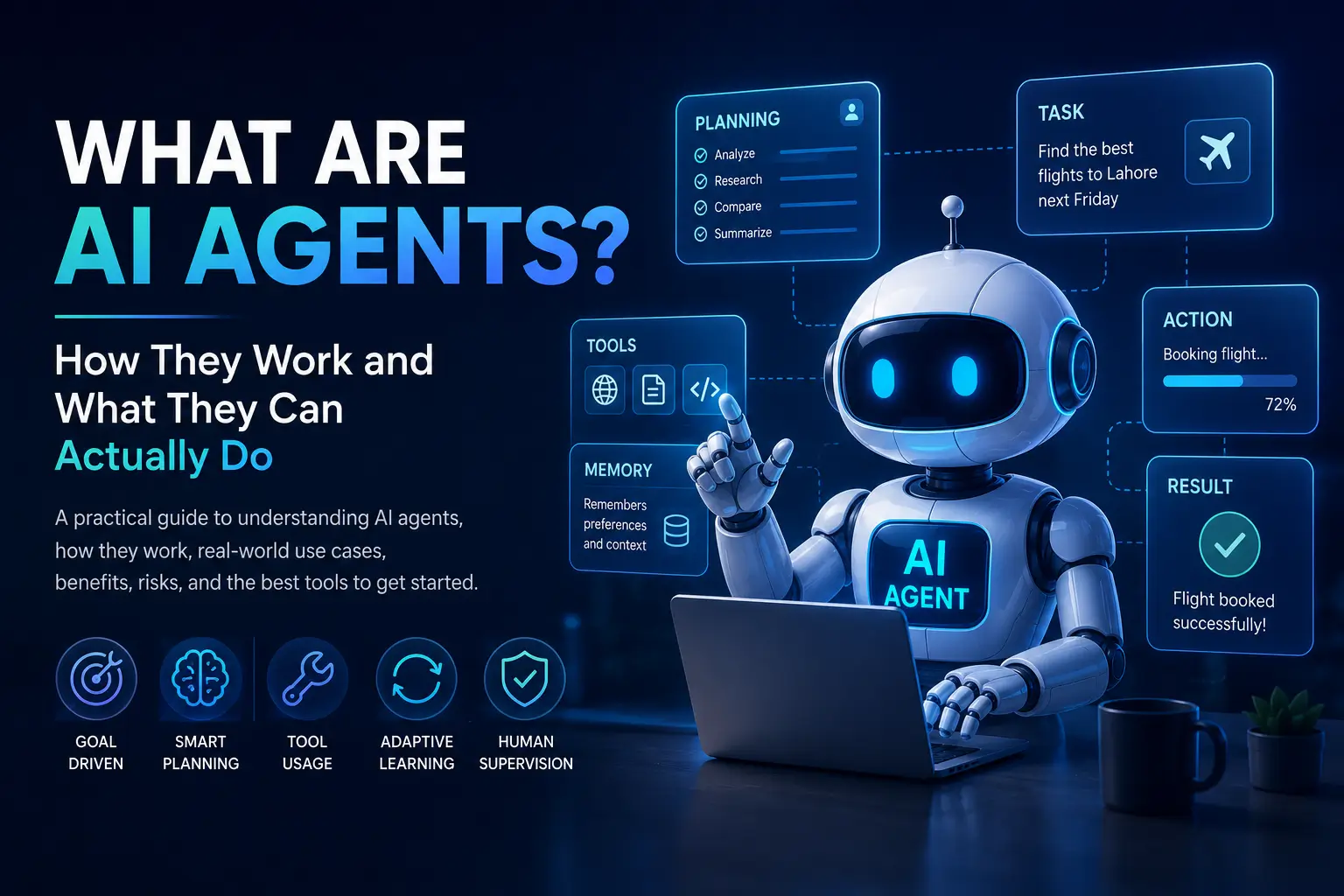
What Are AI Agents? How They Work and What They Can Actually Do
What are AI agents, really? Not just chatbots with a smarter interface. An AI agent can take a goal, figure out the steps needed to achieve it, use tools such as web browsers, code, APIs, and files, learn from the results of its actions, and keep working until the task is finished or it needs human input. That’s the idea behind one of the biggest shifts happening in AI right now.
But there’s a problem: “AI agent” has become a marketing buzzword. Almost every new AI tool seems to call itself an agent, even when it can do little more than answer a prompt. So what actually makes something an AI agent? How does it work behind the scenes? And, more importantly, what can an AI agent realistically do for you today?
The difference matters. A chatbot waits for your next question. Traditional automation follows rules someone programmed in advance. AI agents are designed to work toward a goal, make decisions along the way, use external tools, and adapt when something doesn’t go according to plan. That can make them surprisingly useful — but it can also introduce new risks when an agent is given too much freedom.
In this guide, you’ll learn what AI agents are, how AI agents work, what they can actually do, how they compare with chatbots and traditional automation, where they’re useful, what their limitations are, and how to start using them safely. No hype and no exaggerated promises — just a practical explanation of what this technology can and cannot do in 2026.
By the end, you’ll be able to look at an AI product calling itself an “agent” and understand whether it’s genuinely agentic — or simply a chatbot wearing a new label.
Why AI Agents Matter Right Now
Most software before AI agents worked the same way: you told it exactly what to do, step by step, and it did that one thing. A calculator adds numbers. A spreadsheet formula recalculates when a cell changes. Even “smart” automation tools like Zapier or IFTTT only run pre-written if-this-then-that recipes — powerful, but rigid. If something unexpected happens, they break or do nothing.
Large language models changed the equation. Once a model can understand instructions in plain language, reason through a problem, and decide what to do next, it becomes possible to build software that doesn’t just follow a script — it can figure out the steps itself, adjust when something goes wrong, and use tools (like a web browser, a calendar, or a code editor) to get a job done.
That shift is why AI agents matter. They aim to close the gap between “I told the computer exactly what to do” and “I told the computer what I want, and it worked out how.” For students, freelancers, developers, and small business owners — people who often don’t have a team of assistants — that gap is exactly where a lot of wasted time lives.
It’s worth being honest, though: most AI agents today are narrow and imperfect. They’re best thought of as capable, sometimes clumsy assistants that need supervision, not autonomous employees you can walk away from. The rest of this article will explain why.
What Are AI Agents??
An AI agent is a software system built around a language model that can pursue a goal by planning steps, using external tools, and adjusting its actions based on what it observes along the way — with limited or no step-by-step instruction from a human.
Break that definition into its parts and it becomes clearer:
- Goal-driven: You give it an objective (“book me the cheapest flight to Lahore next Friday” or “find and fix the bug causing this test to fail”), not a list of exact clicks.
- Planning: The agent breaks the goal into smaller steps on its own.
- Tool use: It can act in the real world — searching the web, running code, sending emails, querying a database — rather than just producing text.
- Feedback loop: It looks at the result of each action and decides what to do next, rather than following a fixed script.
A simpler way to think about it: a chatbot answers your question. An AI agent tries to complete your task.
That said, “AI agent” isn’t a single fixed technology — it’s a pattern of system design. Some agents are very simple (a script that asks a language model “what should I do next?” in a loop). Others are complex, multi-agent systems where several specialized AI components hand work off to each other, with monitoring, retries, and safeguards built in. The label covers a wide spectrum, and it’s fair to be skeptical when a product calls itself an “agent” without saying which end of that spectrum it sits on.
How AI Agents Actually Work
Most AI agents, regardless of how they’re marketed, are built around a repeating loop. Understanding this loop is the fastest way to understand what agents can and can’t do.
For a deeper technical look at agent architectures, tool use, and different approaches to building effective agents, Anthropic’s Building Effective AI Agents guide provides a useful reference.
1. Understanding the Goal
The process starts with an instruction — a prompt from a user, a trigger from another system, or a scheduled task. The agent’s underlying language model interprets this instruction, much like it would interpret any prompt, but with an added expectation: instead of just answering, it needs to figure out a course of action.
2. Planning
Next, the agent breaks the goal into smaller sub-tasks. If the goal is “research three competitors and summarize their pricing,” the agent might plan: search for competitor names, visit their websites, extract pricing information, and compile it into a table. This planning step is often invisible to the user, but it’s the core of what separates an agent from a plain chatbot response.
More advanced agents can revise their plan mid-task. If a planned step fails — a website is down, a file doesn’t exist — the agent can try an alternative approach instead of simply stopping.
3. Tool Use
This is where agents leave the world of pure text generation. Tools might include:
- Web search or browsing
- Code execution environments
- File readers and writers
- APIs for email, calendars, or business software
- Databases and spreadsheets
- Other AI models, for specialized sub-tasks
The agent decides which tool to use, formats a request to that tool, and receives a result back — similar to how a person might decide to open a browser, then a spreadsheet, then their email, in the course of finishing a task.
4. Memory
Agents typically need some form of memory to work well:
- Short-term (working) memory: what’s happened so far in this specific task — which steps are done, what was found, what failed.
- Long-term memory: information that persists across sessions, such as user preferences, past conversations, or a knowledge base the agent can search.
Memory is what allows an agent to avoid repeating a failed action, remember context from earlier in a long task, or recall that you prefer emails written a certain way.
5. Decision-Making and Iteration
After each action, the agent evaluates the outcome. Did the search return useful results? Did the code run without errors? Based on that evaluation, it decides whether to move to the next step, retry, ask the user for clarification, or stop.
This loop — plan, act, observe, decide — repeats until the agent judges the goal complete, hits a limit (like a maximum number of steps), or needs human input.
6. Human Checkpoints
Well-designed agents don’t run unsupervised forever. Many include checkpoints where they pause for approval before doing something consequential — sending an email, making a purchase, deleting a file, or pushing code to production. This isn’t a limitation so much as a safety feature, and it’s one of the most important things to look for when evaluating an agent tool.
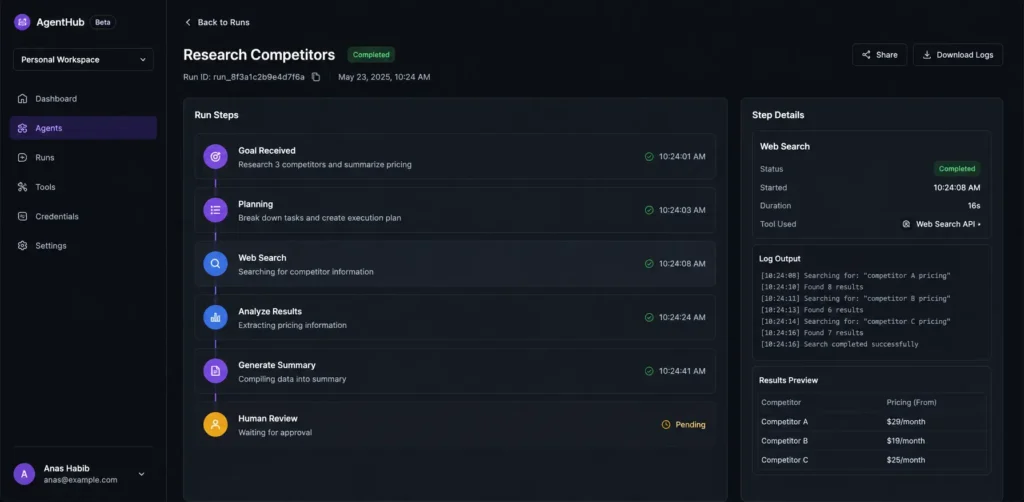
7. A Simple AI Agent Workflow
AI agents usually follow a process like this:
Goal → Planning → Tool Use → Action → Result → Human Review
For example, imagine a user asks an AI agent to research competitors. The agent may break the task into smaller steps, collect information from approved tools or sources, organize the findings, and prepare a summary. A human can then review the final result before making an important decision.
This is one reason AI agents are different from simple chatbots: they can potentially connect multiple steps and tools to work toward a specific goal.
AI Agents vs. Chatbots: What’s the Real Difference?
People often use “AI agent” and “AI chatbot” interchangeably, but they solve different problems.
A chatbot, in the traditional sense, is a conversational interface. You ask something, it responds, based mostly on what it knows or has been shown in the conversation. Even a very capable chatbot is fundamentally reactive — it waits for your next message.
An AI agent is built to act. It can browse the web without you telling it to, run code to test an idea before responding, check your calendar, and take multiple steps toward a goal without needing you to prompt each one individually.
The line has blurred because many modern chatbot products now have agentic features bolted on — for example, a chat assistant that can browse the web or run code when needed. That’s a meaningful upgrade, but it doesn’t automatically make the whole product a full autonomous agent. The clearest test: does it just answer, or does it act on the world and follow up on the results of its own actions?
AI Agents vs. Traditional Automation: What’s the Real Difference?
Traditional automation tools (think Zapier, Make, IFTTT, or a scheduled script) are extremely useful, but they operate on fixed logic: “when X happens, do Y.” They’re fast, cheap, predictable, and reliable — but only within the exact conditions someone anticipated when building the workflow. Change the input even slightly and they can break or behave incorrectly.
AI agents are built to handle ambiguity. Instead of “if the email subject contains ‘invoice,’ move it to the Invoices folder,” an agent-based approach could be “read incoming emails, figure out which ones are invoices even if they’re not labeled that way, and route them appropriately.” The agent uses judgment where traditional automation uses rules.
This doesn’t mean agents are strictly better. Traditional automation is often faster, cheaper, and more predictable for well-defined repetitive tasks. Many of the most practical real-world systems today actually combine both: rule-based automation for the predictable 80%, and an AI agent layered on top to handle the ambiguous or exception-heavy 20%.
The Main Components of an AI Agent
Zooming out, most agent systems are built from the same core building blocks:
- A language model as the reasoning engine — the “brain” that interprets instructions and decides what to do.
- A planner that breaks a goal into steps, sometimes just the model itself prompted to think step-by-step, sometimes a separate planning module.
- Tools/actions the agent is allowed to use, each with clear rules about what it can and can’t do.
- Memory, short-term and sometimes long-term, so the agent has context.
- An orchestration layer that manages the loop: decide, act, observe, repeat — and knows when to stop or ask for help.
- Guardrails and permissions, which limit what the agent can do without approval (for example, requiring confirmation before spending money or deleting data).
If any one of these pieces is missing or weak, the agent tends to fail in predictable ways: no planning means it can’t handle multi-step goals; no memory means it forgets earlier context; weak guardrails mean it might take actions you didn’t want.
What AI Agents Can and Cannot Do
It’s worth being direct about this, because a lot of marketing blurs the line.
AI agents are currently good at:
- Multi-step tasks with a fairly clear goal (research a topic, summarize findings, draft a document)
- Using tools reliably for well-documented tasks (searching the web, querying an API, running code)
- Working through repetitive but variable tasks (sorting and responding to routine emails, extracting data from documents)
- Assisting with coding tasks like writing, testing, and debugging code within a defined project
- Following a plan and adapting when a step doesn’t go as expected, within limits
AI agents currently struggle with:
- Long-horizon tasks with many steps, where small errors compound over time
- Tasks requiring genuine judgment about ambiguous, high-stakes situations (legal, medical, financial decisions)
- Situations where the “correct” action depends on nuanced context the agent doesn’t have access to
- Fully unsupervised operation in unpredictable, real-world environments
- Reliably knowing when it doesn’t know something — agents can be confidently wrong
The realistic summary: AI agents are best used as force multipliers for people who already understand the task, not as unsupervised replacements for judgment. Someone who doesn’t know what a “good” outcome looks like for a task will struggle to catch it when an agent gets something wrong.
10+ Realistic Use Cases for AI Agents
Here’s where AI agents are being used in practical, verifiable ways today, organized by who benefits.
1. Customer support — Agents can read incoming tickets, check order status or account details, and answer common questions or route complex issues to a human. They’re best suited for high-volume, repetitive support questions, not novel or emotionally sensitive situations.
2. Research and information gathering — Given a topic, an agent can search multiple sources, extract relevant facts, and compile a summary or comparison — useful for market research, competitor analysis, or literature review, provided a human verifies the sources.
3. Software development — Coding agents can read a codebase, write or modify code, run tests, and iterate based on the results. This is one of the most mature use cases today, though human review before merging code remains standard practice.
AI is also changing the way developers build, test, and maintain applications. You can learn more in our complete guide to AI software development.
4. Content workflows — An agent can research a topic, draft an outline, write a first draft, and format it for publishing — reducing the blank-page problem for writers, though editing and fact-checking still matter.
AI can also support content creators at different stages of production, from planning and scripting to editing and optimization.
5. Email and task management — Agents can triage inboxes, draft replies in your tone, flag urgent items, and even schedule meetings by checking calendar availability across people.
6. Data analysis — Given a spreadsheet or database, an agent can clean data, run calculations, generate charts, and summarize trends in plain language — a real time-saver for non-technical users, with the caveat that results should be spot-checked.
7. Small business operations — From processing invoices to updating inventory records to answering common customer questions, agents can absorb some of the operational overhead that eats into a small business owner’s day.
8. Personal productivity — Agents integrated with your calendar, notes, and task manager can help plan your day, draft messages, or pull together information you need before a meeting.
9. Recruiting and HR screening — Agents can screen resumes against job criteria and draft initial outreach messages, though decisions about candidates should stay with a human to avoid bias and compliance issues.
10. Sales and lead qualification — Agents can research leads, personalize outreach messages, and log activity in a CRM, freeing sales reps to focus on conversations rather than data entry.
11. IT and DevOps support — Agents can monitor logs, flag anomalies, and even attempt routine fixes (restarting a service, clearing a cache), with human approval for anything higher-risk.
12. Travel and logistics planning — Agents can compare flight and hotel options, check for schedule conflicts, and draft an itinerary based on your preferences.
AI Agents in Real Life: Step-by-Step Examples
Abstract descriptions only go so far. Here’s what an agent-driven task actually looks like in practice, including where human involvement still matters.
Example 1: Researching Competitors for a Small Business
Goal: “Find our top 5 competitors and summarize their pricing and key features.”
- The agent searches the web for businesses in the same category and location.
- It visits each competitor’s website and locates pricing pages.
- It extracts pricing tiers and notable features into a structured table.
- It flags any competitors where pricing wasn’t publicly listed (common for enterprise software) rather than guessing.
- It presents the table to the user for review.
What’s currently realistic: Steps 1–4 can be done largely autonomously today. What still needs a human: Verifying the data is current and accurate, since pricing pages change and agents can misread promotional pricing as standard pricing.
Example 2: Fixing a Failing Software Test
Goal: “This test is failing — find out why and fix it.”
- The agent reads the test file and the code it’s testing.
- It runs the test to see the actual error message.
- It forms a hypothesis about the cause (e.g., a function returns the wrong data type).
- It edits the code and reruns the test.
- If the test still fails, it revises its hypothesis and tries again, up to a limit.
What’s currently realistic: This loop works well for well-scoped bugs in small-to-medium codebases. What still needs a human: Reviewing the fix for side effects elsewhere in the codebase, and for anything touching security or production data.
Example 3: Managing an Inbox
Goal: “Triage my inbox every morning.”
- The agent reads new emails and categorizes them (urgent, routine, spam, newsletters).
- It drafts replies to routine questions using your past writing style as a reference.
- It flags anything that looks time-sensitive or unusual.
- It leaves drafts in your outbox rather than sending automatically, unless you’ve explicitly allowed auto-send for specific categories.
What’s currently realistic: Categorization and draft replies work reasonably well today. What still needs a human: Final approval before sending, especially for anything involving money, commitments, or sensitive topics — agents can misjudge tone or context.
AI Agents vs. Chatbots vs. Traditional Automation
| Factor | AI Agents | Chatbots | Traditional Automation |
|---|---|---|---|
| Autonomy | Can plan and act with limited supervision | Reactive — responds only when prompted | None — follows fixed rules exactly |
| Multi-step tasks | Designed for this; breaks goals into steps | Generally handles one exchange at a time | Only if explicitly programmed step-by-step |
| Decision-making | Makes judgment calls based on context | Minimal — mostly answers questions | None — pure if/then logic |
| Tool usage | Can use multiple tools dynamically as needed | Limited or none, unless agentic features are added | Uses pre-configured integrations only |
| Human supervision | Recommended at key checkpoints | Constant — user drives every turn | Minimal after setup, but brittle to change |
| Flexibility | Handles ambiguity and unexpected situations reasonably well | Low — limited to conversation | Very low — breaks outside expected conditions |
| Best use cases | Research, coding, multi-step workflows, data tasks | Q&A, support conversations, quick lookups | Repetitive, predictable, high-volume tasks |
Benefits of AI Agents
- Time savings on multi-step work: Tasks that would take a person 30 clicks and several tools can often be described in one sentence.
- Handles ambiguity better than fixed rules: Agents can work with incomplete or messy instructions in a way traditional automation can’t.
- Reduces context-switching: One request can span research, writing, and organizing, without you manually shifting between apps.
- Scales repetitive-but-variable work: Tasks that are too varied for simple automation but too repetitive for a human to enjoy doing (sorting documents, drafting routine replies) are a strong fit.
- Lowers the barrier to complex tasks: Non-technical users can direct tasks — like basic data analysis or coding — that previously required specialized skills.
- Availability: Agents can work outside business hours on tasks that don’t require real-time human input.
Limitations and Risks of AI Agents
It’s easy to get caught up in what agents can do. It’s just as important to understand where they can go wrong.
Incorrect outputs: Agents can misread information, misinterpret instructions, or confidently produce wrong answers. Because they act autonomously, an error can cascade into several wrong steps before anyone notices, unlike a single wrong chatbot answer that a human catches immediately.
Security risks: An agent with access to tools and data is also a larger attack surface. If an agent can read web content and then take actions, a malicious webpage could theoretically try to manipulate it — a category of risk often called “prompt injection.” Reputable tools build in defenses, but this remains an active area of concern, not a fully solved problem.
Privacy concerns: Agents that access your email, files, or business systems need meaningful permissions. Understanding exactly what data an agent tool stores, for how long, and whether it’s used to train models matters — and varies significantly between providers.
Unexpected actions: An agent that’s given too much autonomy can take actions you didn’t intend — sending an email prematurely, deleting the wrong file, or making a purchase based on a misunderstanding. This is why permission checkpoints and limited scopes matter more than raw capability.
Cost: Agentic workflows often involve many more model calls than a single chatbot response, since planning, tool use, and iteration all consume resources. Costs can add up quickly for complex or long-running tasks, and pricing structures vary widely between tools.
Human oversight: Every credible use of AI agents today still benefits from a human reviewing outputs, especially for anything consequential. Treating an agent as “set it and forget it” is currently the most common way people get burned by this technology.
None of this means AI agents aren’t worth using — it means they’re worth using deliberately, with realistic expectations and appropriate limits on what they’re allowed to do without checking in.
How to Get Started with AI Agents
You don’t need to be a developer to start experimenting. Here’s a realistic path:
- Start with a chatbot’s built-in agentic features. Many mainstream AI assistants now include web browsing, code execution, or file handling. This is the lowest-risk way to see agent-style behavior without setting anything up.
- Pick one narrow, low-stakes task. Don’t start with “manage my whole business.” Start with something like “research three suppliers and summarize their pricing” or “draft replies to these ten emails.”
- Review everything the agent does, at first. Treat the first several runs like you’re training a new employee — check the work closely before trusting it with less oversight.
- Set clear boundaries. If a tool lets you require approval before it sends messages, spends money, or deletes data, use that setting, even if it slows things down slightly.
- Expand gradually. Once you trust an agent with one task, extend it to adjacent tasks rather than jumping straight to fully autonomous operation.
- Keep a human checkpoint for anything consequential. Financial transactions, legal matters, and anything sent externally under your name should generally get a final human look before it goes out.
- Track what it actually saves you. Time saved is the real measure of value — not how impressive the demo looks.
Best AI Agent Tools to Explore
The tools landscape for AI agents is moving quickly, and specific pricing, limits, and features change often — always check the provider’s own site for current details before relying on anything here. This is a snapshot, not an endorsement, and it isn’t exhaustive.
General-purpose chat assistants with agentic features (from major AI labs like Anthropic, OpenAI, and Google) — these now commonly include web browsing, code execution, and file handling built into the same interface you already use for chat. Best for: beginners who want to try agent-style workflows without installing anything. Limitation: capabilities and limits vary by plan, and full autonomous multi-app control is usually a separate, more advanced feature than basic chat.
Coding-focused agents (such as GitHub Copilot’s agent mode, Cursor, and similar AI-native coding tools) — these read a codebase, write and test code, and iterate on failures. Best for: developers and technical founders. Limitation: still requires human code review, and works best on well-scoped, well-documented codebases.
Developers can also explore modern AI coding assistants to speed up repetitive programming tasks and better understand unfamiliar code.
Workflow and business automation platforms with agent features (such as Zapier and Make, which have added AI agent capabilities on top of their existing automation tools) — these let you combine traditional rule-based automation with agent-style decision-making steps. Best for: small business owners and non-technical teams already using these platforms for automation. Limitation: agent features are often an add-on to a primarily rule-based system, so complex reasoning tasks may be limited.
Developer frameworks (such as LangChain and LangGraph) — open-source libraries that let developers build custom agents with fine-grained control over planning, memory, and tool access. Best for: developers building bespoke agent applications. Limitation: requires real programming skill and ongoing engineering effort; not a plug-and-play product.
Enterprise agent platforms (such as Microsoft Copilot Studio and Salesforce Agentforce) — these embed agents directly into existing enterprise software (Microsoft 365, Salesforce CRM) with built-in governance features. Best for: larger organizations already using that software ecosystem. Limitation: typically requires a qualifying subscription to the underlying platform and has a learning curve for configuration.
AI-native personal/business assistants (a growing category of products marketed specifically as always-on agents for scheduling, email, and admin work) — this space includes many newer entrants. Best for: solo founders and small teams wanting an assistant-style experience. Limitation: this category changes rapidly, quality varies a lot between providers, and claims about capability should be tested with a low-stakes task before you trust one with anything important. (Specific product recommendations here need direct, current verification — the field turns over quickly.)
If you’re evaluating any agent tool, ask three questions before adopting it: What data can it access? What actions can it take without asking me first? And what happens when it gets something wrong?
Frequently Asked Questions
What is an AI agent?
An AI agent is a software system designed to work toward a specific goal. Depending on its capabilities, it can analyze information, make decisions, use tools, and complete multiple steps with different levels of human supervision.
What is the difference between an AI agent and a chatbot?
A chatbot mainly responds to user prompts, while an AI agent may be able to plan tasks, use connected tools, and complete multiple steps to achieve a goal.
Can AI agents work without human supervision?
Some AI agents can perform limited tasks independently, but important actions should still have appropriate human oversight, especially when security, money, private data, or high-impact decisions are involved.
What can AI agents be used for?
AI agents can assist with research, customer support, software development, content workflows, data analysis, task management, and other repetitive or multi-step processes.
Are AI agents safe to use?
Their safety depends on how they are designed, configured, and monitored. Users should consider privacy, security, permissions, and the possible consequences of incorrect actions.
Do AI agents replace human workers?
AI agents can automate or assist with certain tasks, but they do not automatically replace human judgment, expertise, creativity, or responsibility.
Is an AI agent the same as artificial general intelligence (AGI)?
No. AI agents are a way of structuring existing AI models to plan and act on tasks. They don’t represent human-level general intelligence — they’re narrow tools that combine a language model with planning and tool-use capabilities.
Do I need to know how to code to use an AI agent?
Not necessarily. Many consumer-facing agent tools are designed for non-technical users through chat interfaces. Building a fully custom agent from scratch typically does require programming knowledge.
Can an AI agent replace a human employee?
For most real jobs, no — not currently. Agents can absorb specific repetitive or research-heavy tasks, but they lack the judgment, accountability, and contextual understanding needed for most roles in full.
Are AI agents safe to give access to my email or bank account?
Approach this cautiously. Only grant access you’re comfortable with, use tools that offer clear permission controls, and prefer agents that require approval before taking consequential actions like sending payments.
How much do AI agent tools cost?
This varies enormously depending on the tool and how heavily you use it, from free tiers built into existing chat assistants to significant monthly costs for business platforms. Always check current pricing directly with the provider, since it changes frequently.
What’s the difference between a single agent and a “multi-agent” system?
A single agent handles a task with one model and one loop of planning and acting. A multi-agent system splits a task among several specialized agents (for example, one that researches and one that writes), which can improve quality on complex tasks but adds cost and complexity.
Can AI agents make mistakes that cost me money?
Yes, this is a real risk, particularly if an agent has permission to make purchases, send communications, or modify data without a human checkpoint. This is why setting clear boundaries matters more than raw trust in the tool.
How do I know if a tool calling itself an “AI agent” is actually agentic?
Ask whether it can take multiple independent actions toward a goal without you prompting each step, and whether it can use external tools. If it only responds to your messages one at a time, it’s functioning more like a chatbot, regardless of the label.
Will AI agents get significantly better soon?
This is a reasonable expectation given the pace of development, but it’s a prediction, not a fact. Current limitations — reliability on long tasks, judgment in ambiguous situations — are active areas of research, and how quickly they improve isn’t guaranteed.
What’s the best first AI agent task for a beginner to try?
Something narrow, low-risk, and easy to verify: summarizing research on a topic, drafting (not sending) email replies, or organizing a messy spreadsheet. These let you see how the agent works without real consequences if it makes a mistake.
Conclusion: A Realistic Way to Think About AI Agents
AI agents are a genuine step forward from both traditional automation and plain chatbots — they can handle ambiguity, use tools, and work through multi-step tasks with far less hand-holding than either of those older approaches required. That’s real, useful progress, and it’s worth exploring if you have tasks that eat up time without needing constant judgment calls.
But the honest picture is that agents today are capable assistants, not autonomous employees. They make mistakes, they can be misled, and they work best with clear boundaries and a human checking the important decisions. The people getting genuine value out of AI agents right now aren’t the ones handing over the keys entirely — they’re the ones who start small, verify results, and gradually expand what they trust the agent to do on its own.
If you’re new to this space, the best move isn’t to find “the best AI agent” and adopt it wholesale. It’s to pick one annoying, repetitive, well-defined task in your own work, try an agent on it, and see honestly whether it saves you time. Build your understanding — and your trust — from there.
About the Author
Anas is a technology and AI writer at AppStackr, covering artificial intelligence, software, digital tools, and emerging technology. The goal of AppStackr is to make complex technology easier to understand through practical and useful guides.